Issues generating installer with BitRock InstallBuilder
Objective
Simple code to create a linux installer with BitRocks InstallBuilder
Target Audience
Developers new to BitRocks InstallBuilder and Cross-platform installation Tools
Source Documents
Bitrock Installbuilder
Bitrock Installbuilder Documentation
Bitrock Installbuilder Java Runtimes
NetBeans Native packaging
JavaFX Packager
gradle wrapper
Summary
Resolve path issues for the bundled java runtime(jre) for a native installer created by using Bitrocks Installbuilder.
Result
See the Demo app
Using the gradle wrapper build with ./gradlew bootRepackage then create the arifacts for Installbuilder with ./gradlew deployStaging
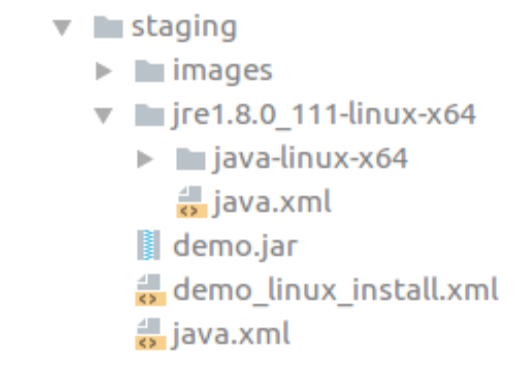
This creates a staging directory with all the artifacts assembled for Bitrock with the correct relative paths for the bundled java runtime environment. See Fig 1.
Discussion
When developing standalone applications many clients sadly will use windows and not really understand how their box is configured. You can not just give them an uber jar and say ‘run the jar’ at least not if they are providing the cash incentives. They will reasonably expect an installer that produces a desktop shortcut that they can click to run the application.
Bitrocks Installbuilder is a cross-platform installation tool. Its a step up from the other available options (NetBeans Native packaging, JavaFX Packager ) as it has a wide range of target programming languages (not just java) and platforms. InstallBuilder creates native applications with a bundled runtime(Java or other) and it is generally trivial to set it up.
I ran into an issue with the Documentation for delivering a java application with no external dependencies(bundled jre). Installbuilder is highly configurable and works in many different contexts (Server, RPM Integration, Auto-Update). The extent to which you can customise the install process requires extensive documentation.
I think the section on creating a bundled java runtime(jre) is not as clear as could be for many new to installers and Bitrock. I was able to configure a successful installer with a bundled jre by following the steps below
download the Bitrock Installbuilder Java Runtime
change the java.xml file so the path correctly resolves to the Installbuilder Java Runtime
include the java.xml file in the Installbuilder components tag and use it to create a java launcher
generate a staging directory (with all the needed artifacts) with gradle, see the custom task
./gradlew deployStagingand see Fig1 for the assembled artifacts output from this taskFig1
More Details
Fig2
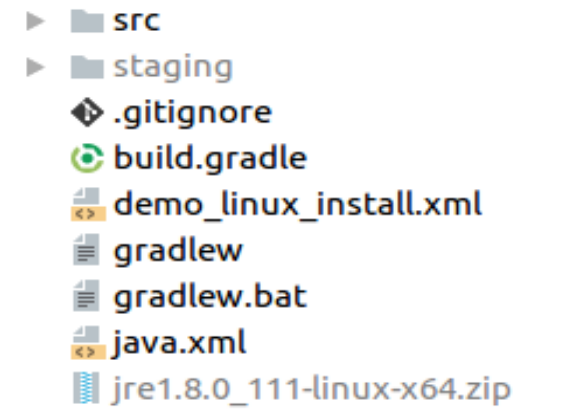
From Fig 2 you can see the top level artifacts that need to be resolved to the staging directory. The jre1.8.0_111-linux-x64.zip file is the jre bundle you need to download
In the staging directory shown in Fig 1 you can see two copies of java.xml. One in the jre bundle and one that is modified and copied to the staging directory by gradle.
The java.xml in the top level directory contains a diferent path the to decompressed jre than the path found in the original java.xml that is found packaged in the Bitrock jre bundle jre1.8.0_111-linux-x64.zip.
The file demo_linux_install.xml is the bitrock installation file that configures Installbuilder. You load demo_linux_install.xml from the staging directory into Installbuilder and it should resolve the paths and deploy the jre in the distribution.
See line 51 for how the modified java.xml file is included as a Installbuilder component. See line 48 for how this java.xml was updated so that the paths resolve when the downloded Bitrock Installbuilder Java Runtime is unzipped by gradle and copied to the staging directory with all the other artifacts.
The rest of the configuration details are self explanatory. Note the code creates a 64 bit linux installer. However the changes required for this to work on Windows or Mac are small. The issue is to get the paths to resolve correctly.
To install Installbuilder on 64 bit Debian was a challenge as the Installbuilder object files are 32 bit. The following worked to configure my 64 bit Ubuntu to work with the 32 bit Bitrock Installbuilder tool.
'sudo apt-get install -y libc6-i386 lib32stdc++6 lib32gcc1 lib32ncurses5 lib32z1'
'sudo apt-get  install libgtk2.0-0:i386'
Installbuilder is closed source with a commercial license. However if you are working with a range of platforms, programming language environments and runtimes it can significantly boost productivity.